Spahlman strikes back!

One of the things I have been noticing with increasing clarity over the past few years, every time “digital security” comes up, is that a growing part of the problem is not actually being solved by companies at all: it is simply being redistributed onto end users.
In practice, instead of building systems that are genuinely more secure without turning everyday life into a permanent bureaucratic procedure, a vast number of companies are offloading the operational cost of security directly onto the people who use their services.
The result is that keeping your accounts “alive” is slowly becoming a full-time job.
It is no longer just a matter of remembering a decent password, or avoiding the Nigerian attachment written in Comic Sans.
No.
It now means managing an entire personal authentication infrastructure: recovery systems, trusted devices, codes, PINs, apps, backups, emergency procedures, and pseudo-liturgical rituals that change from platform to platform, with no real standardization that normal human beings can actually understand.
For example: you go on vacation.
A theoretically simple scenario. You take your personal phone with you, perhaps you even want to detox from work, so you leave your company phone at home, along with your laptop, desktop, secondary tablet, that old phone number used only for certain accounts, and for two weeks you live like an almost normal person.
Mistake.
Because when you come back, you may discover that your digital ecosystem has interpreted your absence as a form of heresy.
Your Apple account, for example, may decide to regard you with suspicion because you dared to turn off or ignore a device for too long. It does not necessarily lock you out, but it often begins that subtle psychological warfare made up of verifications, confirmations, codes, authentication requests, and recovery processes that seem designed by someone convinced that the average user is simultaneously an international criminal and an idiot.
And that is when the circus begins.
Password.
Then the password required to access the system that stores the passwords.
Then the PIN.
Then the second PIN.
Then the authentication app.
But careful: not always the same one.
Because some want Microsoft Authenticator, complete with a little number to type in as though you were defusing a bomb in 1997.
Others want Google Authenticator.
Still others may accept standard TOTP, perhaps, but only if Mercury is in retrograde and your browser has not decided to reinterpret the protocol according to its own local religion.
I, naïvely, had even convinced myself that a YubiKey might represent some kind of elegant solution: a physical key, a standard, something rational.
Naivety.
Because in the wonderful world of contemporary security, the exact same technology is called different names by different websites, different browsers, different systems, and is often implemented in ways so creatively inconsistent that a standard becomes a semantic lottery.
Every platform seems to have its own esoteric dialect of the word “security.”
And naturally, not everyone accepts a normal password manager, because that would be far too simple.
Some websites have issues with password copy-and-paste, as though disabling a basic function actually increased security instead of merely increasing the amount of profanity.
Others insist on sending requests to “trusted devices” that, at that exact moment, may be 800 kilometers away, inside a backpack, powered off, or locked in a drawer.
For mysterious “compatibility reasons,” of course.
Then there are those like Revolut, which occasionally seem to wake up one morning and decide that, for no reason remotely comprehensible to the user, you must once again prove that you are yourself.
Not because anything happened.
Not because there was an attack.
Simply because yes.
Because some algorithm had a mystical vision.
And so there you are again, photographing documents, taking biometric selfies, confirming emails, SMS messages, codes, push notifications, and, presumably soon enough, blood tests.
The number of authentication factors, meanwhile, keeps growing.
At first it was a password.
Then two-factor authentication. Then three.
They are beginning to resemble razor blades.
At this point, we are well on our way to a system in which, just to check your account balance, you will need:
a password, a PIN, an OTP, an email confirmation, facial recognition, a fingerprint, a YubiKey, a notarized certificate, a feudal oath, and perhaps an eyewitness.
Soon I will probably have to start breeding carrier pigeons to support the new Pigeon Authentication Factor, in which a certified dove will fly to my house carrying a code written on encrypted parchment.
And the truly grotesque point is not that security is useless.
Security matters.
It absolutely matters.
The problem begins when complexity is transferred almost entirely onto the user, turning protection into a form of continuous maintenance that is stressful, opaque, and often arbitrary.
Because at that point, you are no longer building secure systems.
You are simply externalizing the organizational cost of your own design failures.
And, as so often happens, the one working for free to keep the whole system standing… is the customer.
This trend is unfolding on a global scale, and rather effectively too.
By now, whenever we open something on a phone, we are never entirely certain that it will simply open and function normally.
Far more often, we are asked to verify our account.
And this does not really change even if you use password managers.
The most common browsers will have their own authentication menus, each trying to save your password themselves, with the frequent result of making manual entry absurdly difficult—especially on mobile devices.
Meanwhile, mobile keyboards increasingly tend to distrust your password manager, treating it as something potentially suspicious, almost as though it were a possible keylogger.
As if that were not enough, websites themselves are not always particularly friendly toward password managers either.
And, as though that still were not sufficient, passwords must follow ever-changing criteria from site to site, meaning that your password manager is often obstructed precisely in what should be its most logical function: generating secure, practical credentials.
In the end, the result risks becoming deeply paradoxical.
You may find yourself with a nice little notebook containing all your passwords.
Written on paper.
Is all of this what security looks like?
Absolutely not.
Because the real problem is that every company, in the name of “innovation,” increasingly tends to invent its own private method of doing “security.”
And at that point, the user can do little more than find some way—somewhere—to keep track of all those strange requirements, all different, all often incompatible with one another.
Each company will insist that its own method is better.
But from the user’s perspective, precisely because they are all different, the final result is simply chaos.
Needless to say, if cybersecurity becomes a business, and that business consists of selling compliance instead of solving problems, then the problem itself can only explode.
Because at that point, the real issue is no longer making systems genuinely secure, but constructing an entire economy based on certifying that formally correct procedures are being followed.
Companies will inevitably begin, first and foremost, by forcing everyone internally to obtain useless certifications—professional, institutional, or global.
Today TISAX is fashionable. Once it was ISO27001. Naturally, there have been many others, and there will be many more.
But in the end, what these certifications really do is certify that one is dealing with so-called good practices, or best practices.
Whether those best practices are actually effective is another matter entirely.
In fact, quite often they are not.
Security incidents continue.
Data leaks continue.
Compromises continue.
Breaches continue.
And this alone should strongly suggest that there is a rather substantial difference between formally following a checklist and actually making systems secure.
And so the true corporate question inevitably becomes this:
“We have no idea how to actually secure our systems, security is expensive, and now there are even penalties for data leaks, and we do not want trouble. What do we do?”
We spread the problem onto the users.
Or, to preserve the original Italian flavor more precisely, we “spalmare” it onto them—because spalmare in Italian literally means to spread something around, like butter over bread, smearing or distributing it across a surface.
And so enters Spahlman, the superhero whose special power is precisely this: spreading the problem across ordinary people, smearing operational burden onto the public, while moving at the speed of a liability waiver.
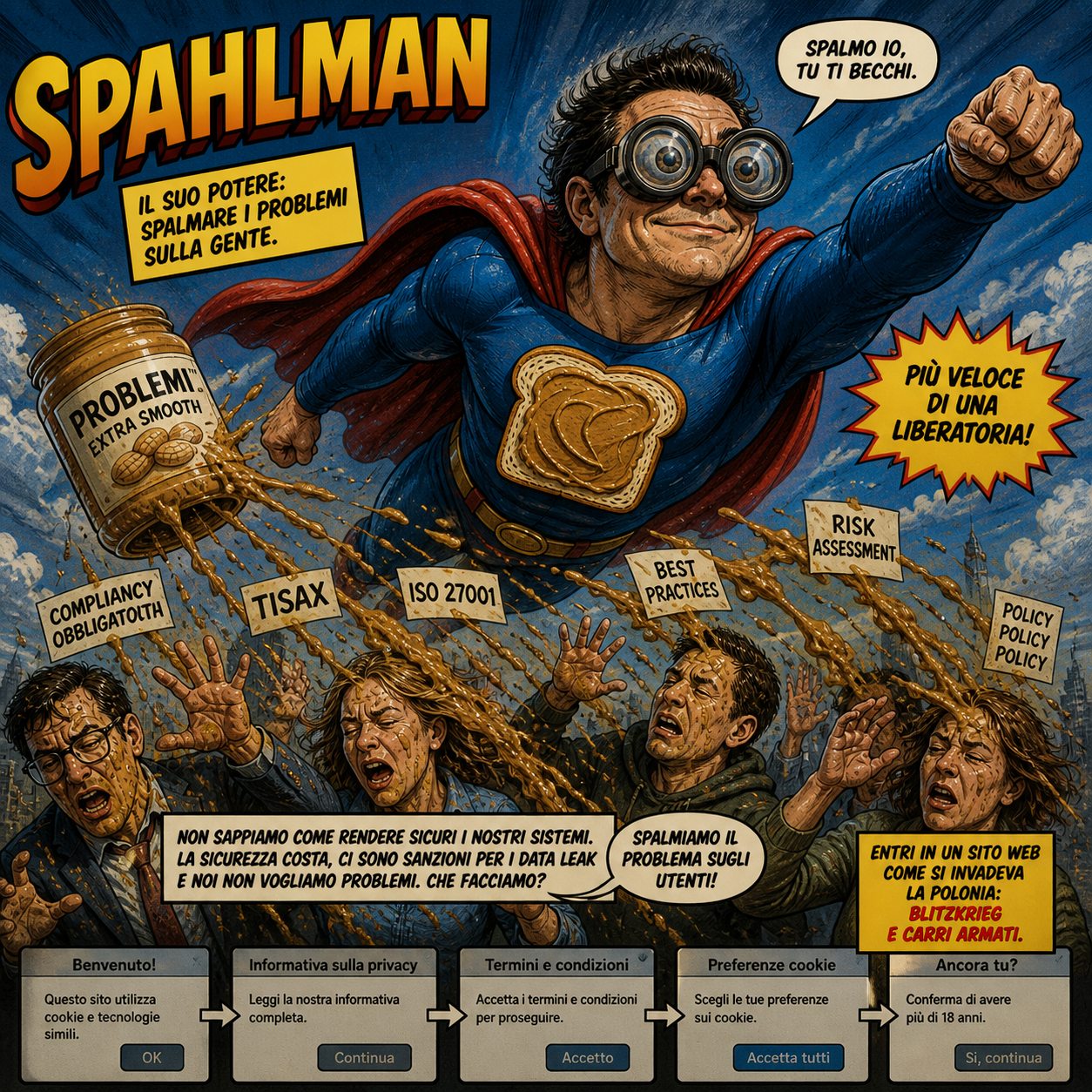
And this is precisely the paradigm.
The problem is not truly solved, complexity is not eliminated, and a better system is not necessarily built: instead, the operational, bureaucratic, and psychological cost is redistributed onto end users.
So when you enter a website, you are not really entering a website.
First, there is a popup.
Then a second one.
Then you have to accept the terms.
Then you have to say yes to cookies.
Then perhaps you must confirm additional preferences, additional consents, additional exceptions, additional partners, additional legitimate interests, in a sequence that often feels designed not to genuinely inform you, but to extract from you a kind of administrative surrender.
By now, entering a website increasingly resembles less the act of accessing a service and more a form of high-speed bureaucratic invasion.
Once upon a time, Poland was invaded with blitzkrieg and tanks.
Today, one enters online territory through popups, checkboxes, cookie banners, and liability waivers.
The tools change, but the underlying principle remains remarkably similar: advance rapidly, occupy space, overwhelm resistance, and secure consent before the target has either the time or the patience to fully understand what is happening.
You may have noticed that there is no banner of any kind when entering this blog.
The reason is simple: the GDPR, contrary to what half the internet now seems to believe, does not actually prescribe that permanent circus of popups, waivers, invasive windows, and settings panels worthy of the control room of a nuclear power plant.
Why is that?
The GDPR?
No.
The GDPR does not require them.
Omnipresent preemptive waivers are not mandatory, hysterical screens are not mandatory, paranoid configuration menus placed at the entrance like administrative checkpoints are not mandatory, and practically none of this is inherently required—at least not in the way it is commonly presented today.
The point is much simpler:
You must comply with the rules governing data processing.
That is all.
Which means that when your activity is non-commercial, you do not collect trackers, you do not use invasive advertising systems, you do not store superfluous logs, you do not profile users, and you do not accumulate unnecessary data, the problem simply shrinks enormously.
In my case, for example, I store virtually no data at all.
Which means I do not need any banner, any popup, or any theatrical consent request constructed more to offload liability than to genuinely protect anyone.
Because the GDPR does not, in essence, require you to transform every visitor into the digital equivalent of a survivor of airport security.
It requires you to handle data properly—if you handle it at all.
And this distinction, apparently simple, is often buried beneath mountains of performative compliance.
The real problem is that many companies, instead of genuinely minimizing data collection, prefer to construct gigantic consent apparatuses that often serve less to limit collection than to legitimize it.
And thus the paradox is born.
They tell you they are “protecting your privacy” by forcing you to click through twenty-four menus, thirty-two exceptions, forty-eight third-party vendors, and enough options to make filing taxes seem refreshingly straightforward.
Some social platforms, in particular, even allow you to “configure your privacy” with extreme granularity.
Which sounds excellent—until you stop for a moment and do the math.
Because if you have, for example, 24 individually configurable yes/no options, then you have two to the power of twenty-four possible configurations.
That is 16,777,216 combinations.
Millions.
More than enough not merely to protect you, but to transform your set of preferences into a distinctive signature—a kind of statistical personality fingerprint.
In practice, the way you answer privacy questions can itself become a profiling tool.
In other words: they can profile you through the very way you attempt not to be profiled.
And if that were not such a perfectly modern phenomenon, it would almost be funny.
Because at that point, the paradox is complete:
The ritual nominally constructed to defend your privacy can, in certain cases, generate additional data useful for distinguishing you as a specific category.
Is that not absurd?
Then again, on reflection, it may actually be the perfect summary of the entire digital age:
To transform even your attempt to escape the problem into yet another input for the system.
At the center of all this lies an entire ecosystem of legal superstition: the now widespread belief that endless Terms & Conditions, popups, banners, waivers, and consent screens somehow constitute a form of real protection.
In reality, in the event of verified GDPR violations, neither your Terms & Conditions nor your popup would truly protect you from legal action.
In substance, they are almost entirely useless in relation to the actual problem.
If you are handling data unlawfully or irresponsibly, the fact that someone clicked “accept” in front of a wall of text does not magically save you.
And yet people have been persuaded that these mechanisms genuinely serve a meaningful protective purpose—partly because they can be useful for further profiling users who waste time navigating endless settings menus, and partly because of the catastrophic ignorance of countless site operators, many of whom sincerely believe that simply placing a waiver in front of users somehow transforms questionable practices into compliance.
It does not.
They do not truly protect users.
They do not truly protect operators.
More often than not, they simply create the theatrical appearance of procedural legitimacy while leaving the underlying behavior fundamentally unchanged.
But why does the problem seem to have worsened so dramatically in recent years, with the baroque excesses of MFA increasingly drifting into the absurd?
The answer is that, this year in the EU, things have genuinely begun to change—but it is important to be precise about which regulation we are actually discussing, because this is not merely another bureaucratic slogan.
The central issue is the new Product Liability Directive: Directive (EU) 2024/2853, which formally entered into force in December 2024, with practical application to products placed on the market after national transposition, due by December 9, 2026.
In other words, it is not that “everything changes tomorrow,” but the legal paradigm has already been rewritten, and manufacturers now have a transitional window in which to adapt.
Put plainly, the truly major shift is that software, software updates, certain integrated digital services, AI systems, and digital components are increasingly being treated explicitly as products—not as metaphysical entities floating in some legal vacuum.
This means that software producers, particularly when software forms part of a commercial ecosystem or distributed product, increasingly resemble less a mere “service provider with creatively written Terms & Conditions” and more a normal industrial manufacturer, with far more concrete liability for damages caused by defects—including relevant cybersecurity defects.
And this is the point that truly matters, and which many are still underestimating:
This directive drastically limits the supposedly salvific value of the classic corporate formula of “we are not responsible for anything, by clicking accept you agree.”
Under the directive, liability toward an injured party cannot simply be excluded or neutralized through private contractual clauses or disclaimers hidden inside online Terms & Conditions.
In essence, if a product is defective and causes harm under the conditions defined by the law, the fact that you wrote a creative disclaimer does not automatically render you untouchable.
This does not mean, of course, that every bug instantly becomes a multimillion-euro lawsuit, nor that every software company will be demolished by its first crash.
But it does mean that the historic model—under which one could largely hide behind licenses, EULAs, endless Terms & Conditions, and formulas such as “as is,” “no warranty,” or “use at your own risk”—is progressively losing much of its automatic immunity when real damage from defective products is involved.
In practice, software producers are becoming progressively more similar to manufacturers in other industrial sectors:
If you sell or distribute something that enters people’s real lives, causes harm, manages security, handles data, governs critical processes, or includes digital components with concrete real-world effects, then you may no longer escape simply by saying, “Well, you accepted the terms.”
And this is where the paradigm shift becomes genuinely interesting.
For roughly forty years, software has often enjoyed, in many contexts, a kind of cultural exception:
“It breaks.”
“It gets patched.”
“Best effort.”
“No system is perfect.”
“By clicking accept…”
Now Europe is progressively saying that if software is a substantial part of a product, or of an economically relevant function, then that structural lightness becomes less tolerable.
Which, translated brutally, means that it will no longer be enough simply to spalmare—to spread, smear, or offload—the entire burden onto the end user through disclaimers, popups, and waivers if the real problem is that the product itself was defective, insecure, or irresponsibly designed.
In essence:
Software is no longer treated merely as abstract magic written by nerds with a paranoid EULA attached.
Increasingly, it is being treated as industry.
And when you are industry, at least in theory, you cannot always get away with claiming that the customer “accepted.”
On this specific issue—namely, the rise of authentication procedures so convoluted they border on the impossible—it may seem, at first glance, that all these legal and regulatory shifts have had little practical effect.
But there is also a fundamental reality that must be understood:
These manufacturers, more often than not, are not truly optimizing the end-user experience in the way users themselves understand that concept.
They are optimizing their own risk.
And that is an enormous difference.
Because from the user’s point of view, the question is simple:
“Why do I have to pass through this bureaucratic hell merely to access something that is mine, or that I pay for?”
From the company’s point of view, however, the question is often entirely different:
“How do we reduce the probability that someone might accuse us, sanction us, sue us, or otherwise generate costs for us?”
And at that point, the criteria change radically.
The goal is not necessarily to build the most elegant system.
Nor the most human one.
Nor even, always, the one that is objectively most effective in absolute security terms.
What is often built instead is the system that most easily allows the company to demonstrate, in the event of problems, that “measures were taken.”
And this is precisely where security stops being merely security.
It becomes legal posture.
Insurance posture.
Bureaucratic posture.
If those measures then make life nearly impossible for millions of users, that is often treated as an acceptable collateral cost—provided the manufacturer can produce checklists, policies, procedures, audit trails, multiple verifications, and systems sufficiently complex to appear diligent.
In other words, a significant portion of these procedures does not necessarily exist primarily to protect you better.
It exists to protect them better.
Or, more precisely, to protect them from the economic, regulatory, or reputational consequences of potential failures.
And this explains why, despite the growing absurdity of certain authentication systems, the overall structure often continues to worsen rather than simplify.
Because the dominant question is not:
“How do we make this access reasonable?”
It is:
“How do we demonstrate that we did enough not to be accused of negligence?”
And so long as that remains the dominant logic, users will increasingly find themselves confronting systems that do not seem designed to be used at all, but rather designed to be defended in court.
And here you can better understand why the deterioration of “security” procedures has become so dramatically pronounced from 2024 onward.
Because the problem, increasingly often, is not really security in the most concrete technical sense of the term.
This is partly because a vast proportion of the most devastating modern attacks no longer target the individual login of the individual user at all, but instead strike supply chains, shared infrastructure, providers, middleware, central platforms, and millions of users simultaneously—that is, precisely the kind of systemic target that makes it rather obvious that driving individual users insane with ever more elephantine authentication procedures is not necessarily the most intelligent response to the real problem.
The point, far more often, is something else:
These companies must above all demonstrate that they did everything possible.
And that is an enormous distinction.
Because “being genuinely secure” and “being able to procedurally demonstrate that maximum effort was made” are not remotely the same thing.
In the first case, we are talking about actual technical effectiveness: architecture, backend integrity, supply chain resilience, robust processes.
In the second, we are also—and often primarily—talking about compliance, audits, legal liability, reputation, insurance, regulators, sanctions, and the ability to stand before someone and say:
“Look how many things we added.”
And this is precisely what is making them progressively more nervous.
Not necessarily more secure.
Not necessarily more competent.
But more nervous.
Because every data leak, every incident, every fine, every scandal, every new regulation, and every escalation in regulatory pressure increases the need to display procedures, verifications, multiple authentication layers, friction, evidence, redundant systems, and expanding levels of control.
The result is that the system rarely trends toward simplification.
Far more often, it accumulates additional steps, factors, verifications, selfies, documents, confirmations, and further obstacles.
And so, rather than seriously asking whether the structural problem has actually been reduced, the focus shifts increasingly toward constructing a defensive narrative in which, should something go wrong, one can at least claim to have done everything possible.
Which means security risks becoming ever more a form of procedural theater, where the point is not necessarily to eliminate vulnerability at its root, but to formally demonstrate that one responded by increasing the operational burden on the user.
And so, at this rate, forgive me, but I may need to go run laps around the block—preferably enough to break a sweat—because Revolut might suddenly decide that the next authentication tier requires DNA extracted from my perspiration, officially inaugurating Sweat Factor Authentication.
Though I fear the step after that will be X-Factor Authentication—
when completing a login will no longer merely require identifying yourself,
but singing as well.